

Feather — CPU, Memory & Network
Feather keeps CPU, memory, network, and disk usage visible in your Mac’s menu bar at all times. No window to open — just glance up and you know where things stand.


Its biggest feature is being light.
If the app you use to watch your memory usage ends up using a lot of memory itself, that defeats the purpose. We cut every bit of waste and made keeping our own footprint small the top priority.
~15MB Typical memory footprint while running
It may briefly exceed 15MB while you have the menu open, but it settles back to around 15MB once you close the menu or relaunch the app.
What it can display
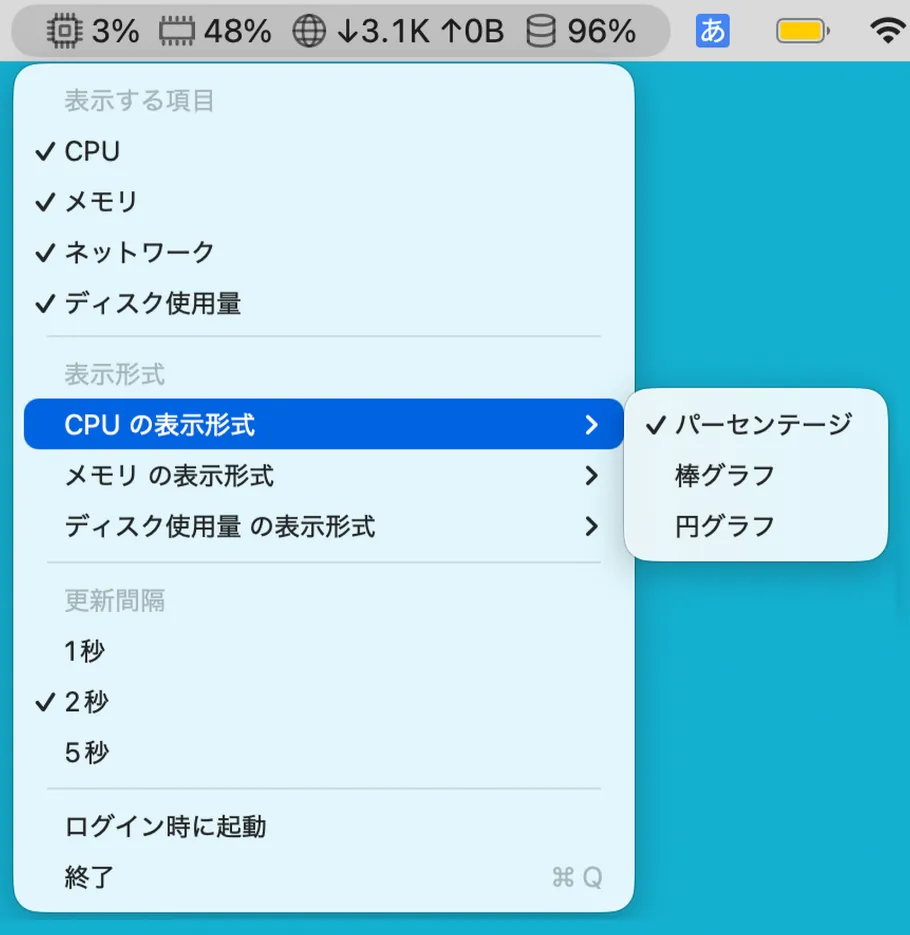
Turn each item on or off individually, and keep only what you need in the menu bar.
CPU usage
Always know how much load your system is under right now.
Memory usage
Notice when free memory is running low, even mid-task.
Network speed
Shows upload and download speed — a quick gauge for downloads or syncs in progress.
Disk usage
See the state of your startup disk before space runs tight.
Choose how it’s shown
Numbers or graphs
CPU and memory can be shown as a percentage, a bar graph, or a pie graph — handy when a filled shape reads faster to you than a number.
Three ways to see disk usage
Choose percentage, free space, or used space. If you want to see “how much room is left” at a glance, free space is the one to pick.
Refresh interval, too
1, 2, or 5 seconds — switch between tracking things closely and keeping it subtle.
There is no settings window
Every setting lives inside the menu bar dropdown. Toggling items and changing display styles both take effect immediately — there’s no separate window to open just to configure the app.
No network communication, ever
Only reads “speed”
The network item only reads the speed of data transfer. It never touches the content or destination of your traffic.
No networking capability at all
This app has no ability to connect to the internet. There is nothing it collects, and nothing it could send externally even if it tried.
Full details are in the Privacy Policy.
Pricing
One-time purchase
¥300
Try it for free before you buy.
- Not a subscription — pay once and there are no further charges
- Every display item and display style is included
System requirements
macOS 14 or later
Frequently asked questions
How much memory does it use?
It runs at around 15MB. While you have the menu open it may briefly exceed that, but it returns to about 15MB once you close the menu or relaunch the app. Since the whole point is to watch your memory usage, it would defeat the purpose for the app itself to be a memory hog — so we cut every bit of waste we could.
Which items can it display?
Four: CPU usage, memory usage, network speed (upload/download), and disk usage. You can turn each item on or off individually, so only the ones you care about show up in the menu bar.
Can I change how each item is displayed?
CPU and memory can be shown as a percentage, a bar graph, or a pie graph. Disk can be shown as a percentage, free space, or used space. The refresh interval can be set to 1, 2, or 5 seconds.
Where do I change the settings?
Everything is done from the menu bar dropdown. Toggling items or changing display styles takes effect immediately, so there is no separate settings window to open — the app simply doesn’t have one.
Can it see the contents of my network traffic?
No. The network item only reads the speed of data transfer — never the content or destination of your traffic. The app has no network capability at all, so it cannot collect or send any information externally. See the privacy policy for details.
Is it paid?
It’s a one-time purchase of ¥300 (about $2). You can try every feature for free before buying — it’s not a subscription, so there are no further charges after purchase.
What are the system requirements?
macOS 14 or later.
For anything else, please reach out via our contact form.
Get Feather on the App Store
Keep your Mac’s status right there in the menu bar.